카프카 컨슈머 장애 경험
· 4 min read

주문, 회원 도메인에서 발생한 카프카 컨슈머 장애 관련 경험담
주문, 회원 도메인에서 발생한 카프카 컨슈머 장애 관련 경험담
팀내 공유 자료
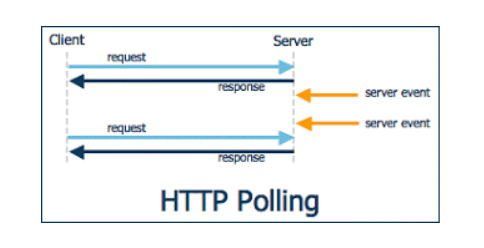
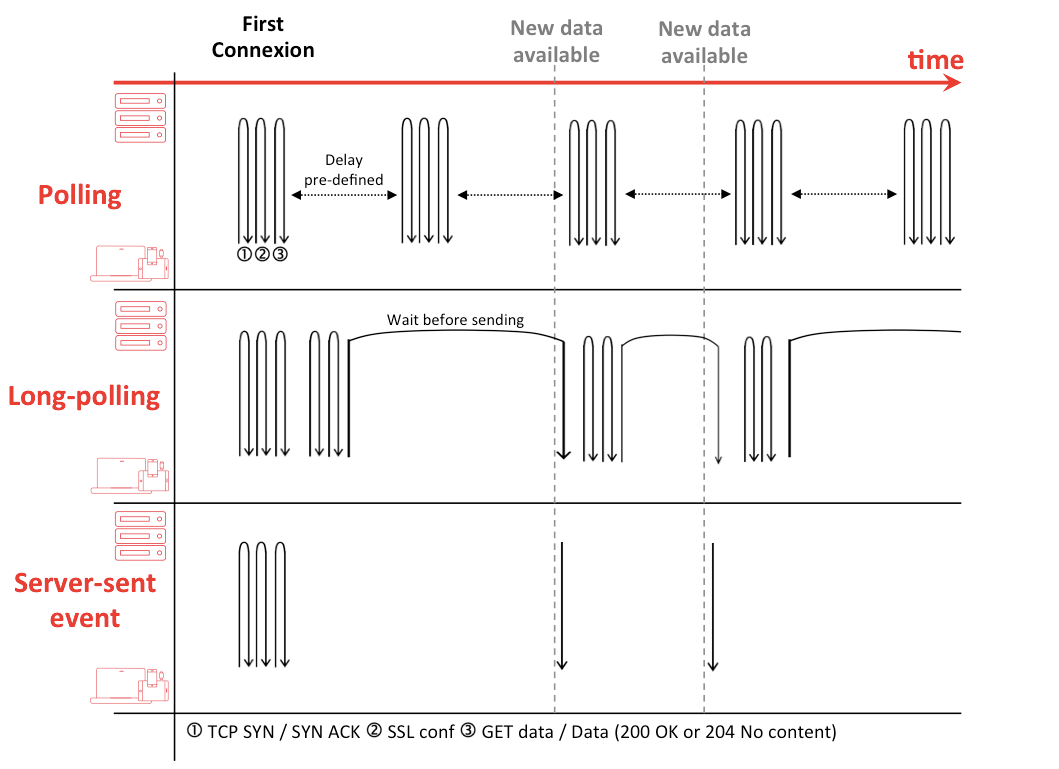
HTTP Polling은 클라이언트가 서버에 주기적으로 HTTP 요청을 보내서 새로운 데이터나 상태 변화를 확인하는 통신 방식
http 1.1에서는 keep-alive가 default이며 모든 요청이 connectionless는 아님

polling과 통신방법은 같으며 요청을 받은 서버는 메세지를 전달할수 있을 때까지(timeout될때까지) 무한정 커넥션을 종료하지 않고 메세지를 전달할수 있을때 응답을 준다.
# multiline data
data: first line\n
data: second line\n\n
# JSON Data
data: {\n
data: "msg": "hello world",\n
data: "id": 12345\n
data: }\n\n
JSON 젹렬화가 복잡해 보이지만 Spring의 Content Negotiation Strategies을 믿어보자.
https://developer.mozilla.org/ko/docs/Web/API/EventSource/EventSource
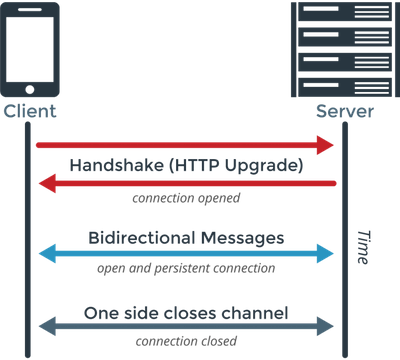
https://developer.mozilla.org/ko/docs/Web/API/WebSocket
repo : https://github.com/chk386/notifications
Mono/Flux는 subscribe하지 않으면 아무일도 일어나지 않는다. 대부분 webflux에서 subscribe를 대신 처리하고 있다.
subscribe 하기전 데이터를 생성할 수 있고 N개의 subscriber가 존재할수 있다. Notification 서버가 최초 기동할때 hot publisher를 메모리에 올려두고 SSE, Websocket 요청시 hot publisher를 구독하여 서버 이벤트를 클라이언트로 푸시할수 있다.
reactor 3.4.0 이전에는 FluxProcessor, MonoProcessor, UnicastProcessor등을 이용하였으나 deprecated
The Sinks categories are:
1. many().multicast(): a sink that will transmit only newly pushed data to its subscribers, honoring their backpressure (newly pushed as in "after the subscriber’s subscription").
2. many().unicast(): same as above, with the twist that data pushed before the first subscriber registers is buffered.
3. many().replay(): a sink that will replay a specified history size of pushed data to new subscribers then continue pushing new data live.
4. one(): a sink that will play a single element to its subscribers
5. empty(): a sink that will play a terminal signal only to its subscribers (error or complete), but can still be viewed as a Mono<T> (notice the generic type <T>).
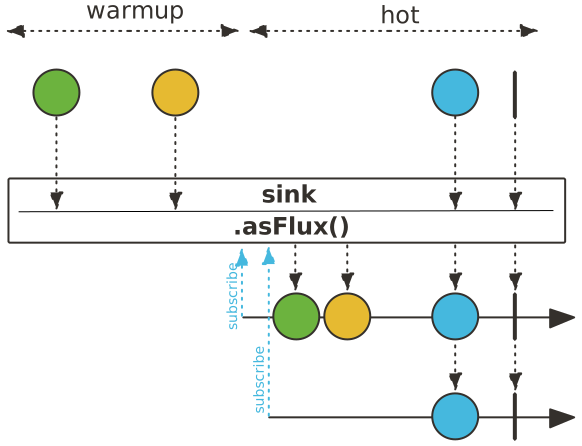
Sinks.many().multicast().onBackpressureBuffer()
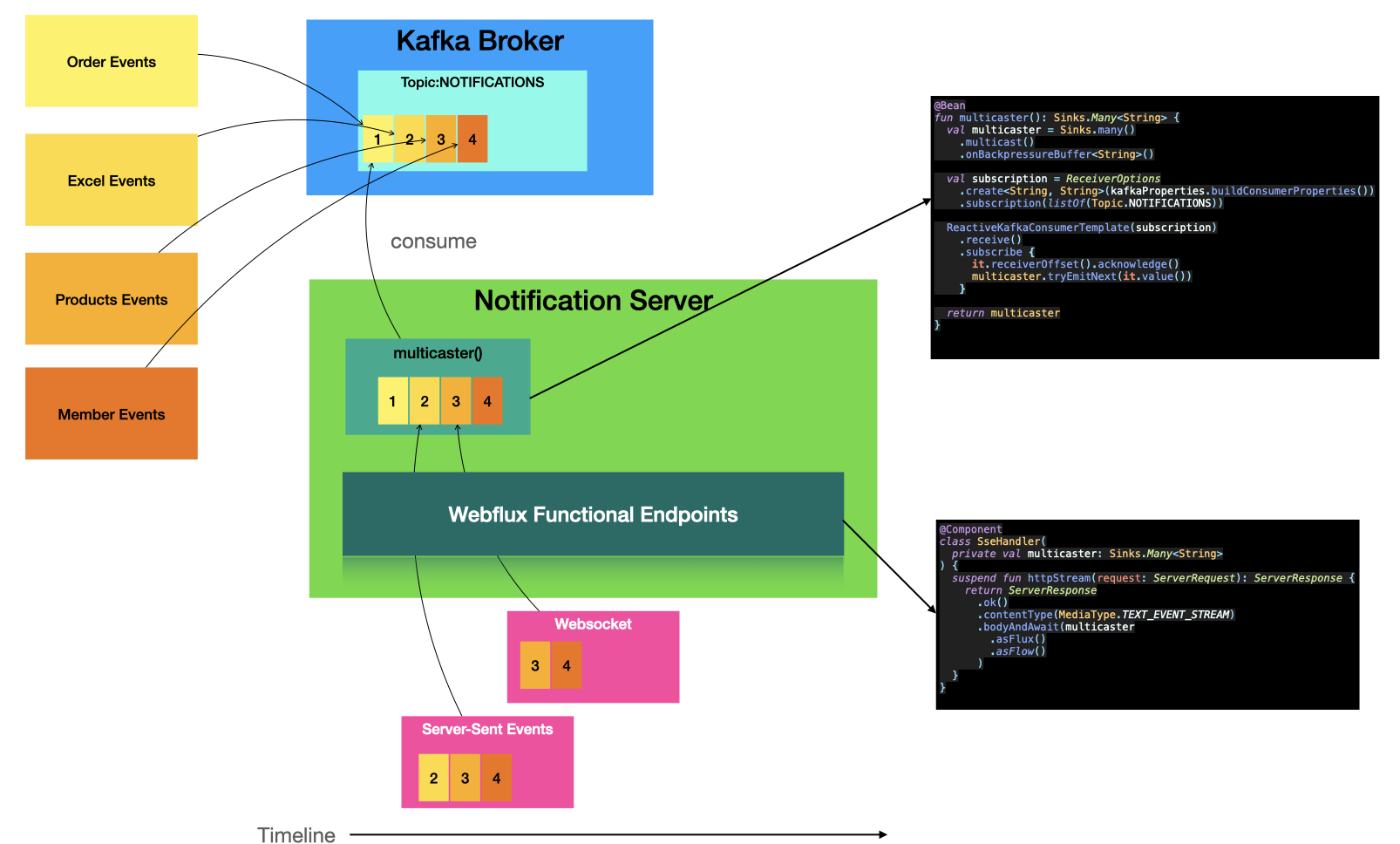
// 메인 클래스
@SpringBootApplication
@EnableWebFlux
class NotificationsApplication {

  @Bean
  fun coRoute(sseHandler: SseHandler): RouterFunction<ServerResponse> {
    return coRouter {
      GET("/notifications", sseHandler::httpStream)
      GET("/produce", sseHandler::produce)
    }
  }

  /**
   * @see <a href="https://docs.spring.io/spring-framework/docs/current/reference/html/web-reactive.html#webflux-websocket-server-handler">참고</a>
   */
  @Bean
  fun handlerMapping(websocketHandler: WebsocketHandler, sampleHandler: SampleHandler): HandlerMapping {
    val map = mapOf(
      "/ws" to websocketHandler, "/ws2" to sampleHandler
    )
    val order = -1 // before annotated controllers

    return SimpleUrlHandlerMapping(map, order)
  }

  @Bean
  fun handlerAdapter() = WebSocketHandlerAdapter()

    @Bean
  @Profile("default")
  fun run(producer: ReactiveKafkaProducerTemplate<String, String>): ApplicationRunner {
    return ApplicationRunner {
      while (true) {
        println("메세지를 입력해주세요.")
        producer.send(Topic.NOTIFICATIONS, GenericMessage(readLine()!!)).subscribe()
      }
    }
  }
}
// 웹소켓 핸들러 구현
@Component
class WebsocketHandler(
  private val producer: ReactiveKafkaProducerTemplate<String, String>,
  private val multicaster: Sinks.Many<String>
) : WebSocketHandler {

  override fun handle(session: WebSocketSession): Mono<Void> {
    val input = session
      .receive()
      .doOnNext {
        producer.send(Topic.NOTIFICATIONS, it.payloadAsText).subscribe()
      }.then()

    val output = session
      .send(multicaster
        .asFlux()
        .filter { it.contains("all:") || it.startsWith(getId(session.handshakeInfo.uri)) }
        .map(session::textMessage)
      )

    return Mono.zip(input, output).then()
  }

  private fun getId(uri: URI): String {
    return UriComponentsBuilder
      .fromUri(uri)
      .build()
      .queryParams["id"].orEmpty()[0]
  }
}
// kafka config
@Configuration
@EnableKafka
class KafkaConfiguration(private val kafkaProperties: KafkaProperties) {

  @Bean
  fun multicaster(): Sinks.Many<String> {
    val multicaster = Sinks.many()
      .multicast()
      .onBackpressureBuffer<String>()

    multicaster.asFlux()
      .subscribe { println("consumer -> Sinks.many().multicast() => $it") }

    consume(multicaster)

    return multicaster
  }

  @Bean
  fun produce(): ReactiveKafkaProducerTemplate<String, String> {
    return ReactiveKafkaProducerTemplate(
      SenderOptions.create(
        kafkaProperties.buildProducerProperties()
      )
    )
  }

  private fun consume(multicaster: Sinks.Many<String>) {
    ReactiveKafkaConsumerTemplate(
      ReceiverOptions
        .create<String, String>(kafkaProperties.buildConsumerProperties())
        .subscription(listOf(Topic.NOTIFICATIONS))
    )
      .receive()
      .doOnNext { it.receiverOffset().acknowledge() }
      .subscribe { multicaster.tryEmitNext(extractMessage(it)) }
  }

  private fun extractMessage(it: ReceiverRecord<String, String>) =
    if (it.value().contains(":")) {
      it.value()
    } else {
      "all:${it.value()}"
    }
}

object Topic {
  const val NOTIFICATIONS = "BACKOFFICE-NOTIFICATIONS"
}
gradle bootBuildImage --imageName=shopby-notification
docker login # docker hub 계정입력
docker tag shopby-notification ${본인의 dockerhub ID}/notification
docker image push ${본인의 dockerhub ID}/notification
# 인스턴스에 ssh 서버접속 후 실행
docker-compose -f docker-compose-nhncloud.yml up
docker run -d -e "SPRING_PROFILES_ACTIVE=cloud" -p 8080:8080 chk386/notification

# 카프카 토픽 & 메세지 생성시
docker exec -it kafka /bin/bsh

# 토픽생성
/bin/kafka-topics --create --topic BACKOFFICE-NOTIFICATIONS --bootstrap-server localhost:9092
# 토픽정보
/bin/kafka-topics --describe --topic BACKOFFICE-NOTIFICATIONS --bootstrap-server localhost:9092
# procude
/bin/kafka-console-producer --topic BACKOFFICE-NOTIFICATIONS --bootstrap-server localhost:9092
# consumer
/bin/kafka-console-consumer --topic BACKOFFICE-NOTIFICATIONS --bootstrap-server localhost:9092
# 토픽 삭제
/bin/kafka-topics --delete --topic BACKOFFICE-NOTIFICATIONS --bootstrap-server localhost:9092